Six Months of C
The past year has brought a lot of changes, not the least of which is that I'm now working primarily in C after a few years of web development in NodeJS/React/general JavaScript land. There's some irony to this given that in my first PyCon talk back in 2022, I proudly declared that I wanted to write as little C/C++ as possible when reimplementing a constraint library in Python using Cython.
However, I've never been particularly happy with high levels of abstraction and black-box implementations going back to my days of frustration with structural engineering software, so maybe it's fitting now that I'm working at a lower level and pursuing performant programming in C. Of course, the switch has meant working with a completely different toolset than I've used in the past, and learning a lot about Emacs along the way.
Base Emacs Configuration
I use Emacs 30.2 installed via the Emacs Plus Homebrew tap with native compilation, along with Doom Emacs to configure most of the features that I want to use.
Some of the packages not included in Doom Emacs that I find particularly useful for general development are:
- git-link - allows you to copy a direct link to Github at the current line (useful for quickly pinpointing code for discussion)
- rainbow-delimiters - highlights parentheses, brackets, braces in different colors (useful for nested input files)
- wgrep - makes a grep buffer editable and allows you to write changes to all files modified in that buffer
Tree-sitter
My main mode when working in C is c-ts-mode, which is the C editing mode powered by tree-sitter
I believe installing tree-sitter per language now is much easier than it used to be, as I only needed to install the C grammar as outlined in this Mastering Emacs article per the "Compiling and Installing with the builtin method in Emacs" section. While the notes say that it doesn't work well unless you're using GCC and running Linux, I didn't have any problems with Clang and MacOS.
I still don't think I'm using Tree-sitter to its full capabilities in Emacs, but it has been fun to explore the code base using treesit-explore-mode and treesit-inspect-mode. I'd like to do more with its code navigation and highlighting, as I'm still relying primarily on projectile for code navigation. While researching some of the links for this blog post, I discovered the Combobulate package (disclaimer, from the same author as Mastering Emacs), which looks like it could be helpful.
Custom formatting rules
Unfortunately, I can't use .clang-format, as there is an unorthodox set of formatting requirements that don't fit into any of the common C standards. As a result, I needed to add the following .clang-format to my base directory to avoid significant frustration.
DisableFormat: true
Org Mode Improvements
One of the biggest boons for navigating a large, unfamiliar codebase (in a new language!) has been utilizing org mode to its fullest. It's how I write out work plans, write code snippets for investigation or debugging, and add in-line images to track current application state.
Early on, I added a function to copy an org mode link to the current file and line number (appropriately named copy-org-link-to-line). This has made it easy to navigate to functions I need to modify in my work plan and include additional context as my understanding of the codebase improves.
(defun copy-org-link-to-line ()
  "Copy an Org mode link to the current file and line number.
  Format: [[file+emacs:/absolute/path/to/file.txt::$line_number][file.txt:$line_number]]"
  (interactive)
  (if-let ((file (buffer-file-name))
           (line (line-number-at-pos)))
        (let ((org-link (format "[[file+emacs:%s::%d][%s:%d]]" file line (file-name-nondirectory file) line)))
            (kill-new org-link)
            (message "Copied %s" org-link))
    (message "Buffer is not visiting a file")))
I've also struggled with tab/space presentation conflicting across different minor modes (probably an artifact from Doom, which has electric-indent-local-mode and ws-butler-mode), so I have a custom display setting for tabs in c-ts-mode:
(standard-display-ascii ?\t "••••")
Debugging with dape
I initially loaded and unloaded debugging files drafted in org-mode and loaded just into the command line lldb. This was largely because I couldn't get debugging with dap-mode to work at all with C. Surprise! This was because I use eglot instead of lsp-mode, as eglot seems to have won out for using language servers within Emacs, and dap-mode seems to be tied to lsp-mode.
In the interest of KISS, I opted to just use dape since it uses eglot out of the box.
I have two 'dape-configs set up in my config.el. One for launching/debugging the GUI, and another for launching/debugging a single test suite, which look something like this:
(after! dap-mode
    (after! dape
        :ensure t
        :config
        (add-to-list 'dape-configs
            `(debug-gui
              modes (c-ts-mode c-mode)
              ensure dape-ensure-command
              command "lldb-dap"
              command-cwd "/Users/mclare/workspaces/prog/bin"
              :type "lldb-dap"
              :request "launch"
              :program "prog_dev"
              :initCommands ["command source -s 0 .lldbinit"]
              :args ["absolute/path/to/test/file"]
            )
        )
        (add-to-list 'dape-configs
            `(debug-test
              modes (c-ts-mode c-mode)
              ensure dape-ensure-command
              command "lldb-dap"
              command-cwd "/Users/mclare/workspaces/prog/bin"
              :type "lldb-dap"
              :request "launch"
              :program "prog_test"
              :initCommands ["command source -s 0 .lldbinit"]
              :args ["--test_suite" "$test_suite_name"]
            )
        )
    )
)
The Good
-
After my frustration trying to configure
dap-mode,dapejust worked! By default, therun adapterfields are easy to figure out before transferring that information to adape-configas I did. -
The
dape-many-windowsbuffer layout is intuitive and easy to work with, providing immediate insight with 3 smaller buffers forLocal/Global/Registers/Watchvariables, theStack/Modules/Sources, andBreakpoints/Threads, as well as positioning thedape-replin a buffer at the bottom of the screen.
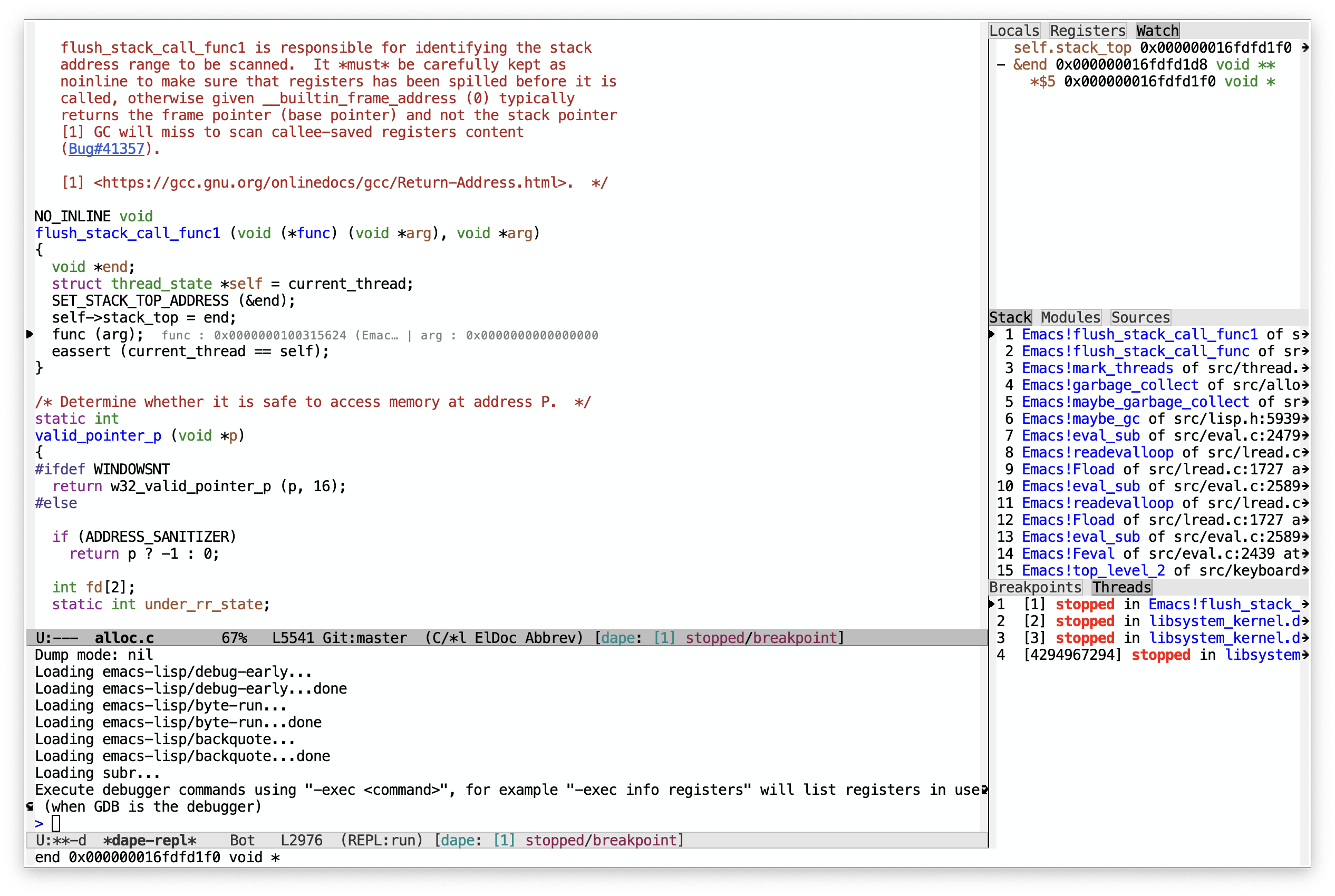
Dape Many Windows (from readme)
The Bad
-
lldbshortcuts do not work in the provideddape-repl. This can get annoying with having to write outbreakpoint --file file.c --line $line_number --condition "i == 200"over and over, rather than the shorthandbrlc. -
Watch variables or conditional statements set in the repl do not appear in the
Breakpoints/Threadswindow, where you can easily delete them, which can be confusing while debugging. -
It also seems to be impossible to "reset" breakpoint counts set using the dape command
M-x M-a b(These are the ones that populate in theBreakpoint/Threadsbuffer) wwithout manually visiting the file. I've had to navigate to the breakpoint location and then toggle on/off to achieve this.
The ??
-
Editing
watchvariables viadape-info-watch-edit-nodeis really weird. I can't figure out how to get it to commit my changes despite the hints indicating it should just beC-c C-c. -
Eglot as a process disconnects a lot. I don't know if this is due to
dapeor just in general while working in my project. I'd say 80% of the time I reach forxref-find-definition, I get a warning thateglotis not connected, which is very frustrating. (I don't get an error upon firingeglot-reconnectthough!).
Other Resources
Especially in the age of LLMs, I'm becoming more and more leery of trusting online tutorials or resources. Since I'm working in C99, it seemed like a good investment to get some C standard texts, since the language is small enough to fit into pretty slim volumes.
Before starting my new job I read:
-
Effective C - though this was a bit of a challenge because it includes updates to cover all the way to C23!
-
The C Programming Language (also known as K&R) - skimmed this one mostly since I've heard the style is outdated
Since starting, I've also acquired:
- C: A Reference Manual - Super useful for the standard library reference
and just for fun (related but not specifically C)...
- The Linux Programming Interface - for really digging into system programming